Backpack System Kit
A downloadable asset pack
🎒 Ultimate Backpack & Inventory System
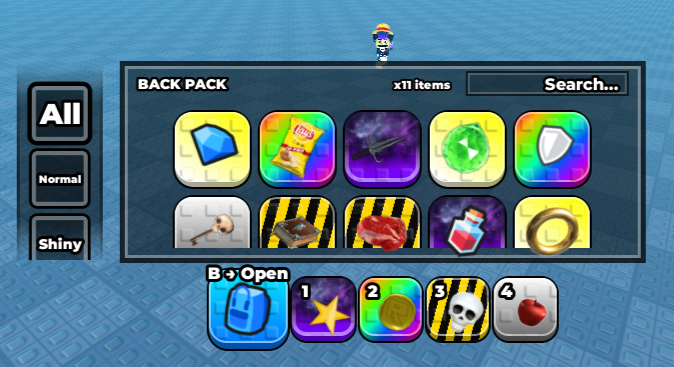
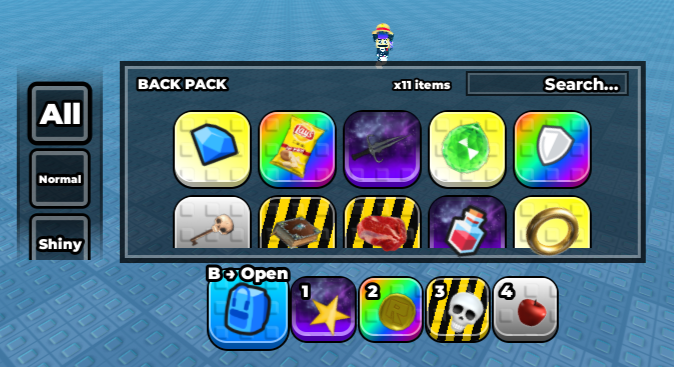
A premium, fully modular Backpack, Hotbar & Inventory system for Roblox — with drag & drop, tooltips, rarity filters, and full gamepad/console support.
✨ Features
🖱️ PC / Mouse & Keyboard
- Drag & Drop — Drag items between Hotbar ↔ Backpack with smooth tilt & wiggle animations
- Dynamic Tooltips — Hover over any item to see its name, icon, and rarity gradient
- Customizable Keybinds — Change the backpack open key in one line of config
- Search Bar — Instantly filter your inventory by item name
- Rarity Filters — Auto-generated sidebar filter buttons based on your custom tags
🎮 Gamepad / Console (Xbox, PlayStation)
- Full D-Pad Navigation — Navigate Hotbar and Backpack slots seamlessly
- Quick Move (X Button) — Instantly transfer items between Hotbar ↔ Backpack
- Item Tooltip (B Button) — Toggle the info tooltip on the selected item
- Bumper Cycling (LB / RB) — Cycle equipped tools with shoulder buttons
- Trigger + Select — Hold trigger and press A to quick-move items
- Smart Selection — After quick-moving, selection stays in the correct panel
- Dynamic Button Labels — HUD text auto-switches between "B → Open" and "Y → Open"
📱 Mobile / Touch
- Tap to Equip — Tap hotbar slots to equip tools
- Touch Drag — Long-press and drag to rearrange items
- Active UI Guards — Prevents accidental camera movement when interacting with slots
🎨 Visual Polish
- Rarity Slot Templates — Each rarity gets its own custom-styled slot (gradients, strokes, colors)
- Tooltip Gradient Sync — Tooltip border automatically mirrors the item's rarity gradient
- Tilt & Wiggle Physics — Items tilt on pickup and wiggle dynamically while dragging
- Smooth Open/Close Animations — Configurable easing styles and speeds
- Hover Animations — Buttons scale and react on hover via UIAnimator
📦 What's Included
Scripts (StarterPlayerScripts.BackpackSystem)
- Bootstrap — Entry point — initializes the entire system
- Config — All settings in one place (keybinds, filters, animations, tooltips)
- InventoryService — Core inventory logic (add/remove/equip events)
- HotbarController — Manages the bottom hotbar UI and slot creation
- BackpackController — Manages the backpack panel, grid, filters, and search
- DragController — Handles drag & drop physics and logic
- UIAnimator — Hover/press animations for all buttons
- SlotInputUtils — Input helpers for gamepad selection
UI (StarterGui.BackpackGui)
- BackFrame — Main container for Hotbar + Backpack panel
- BackFrame.Main.Templates — Slot templates for each rarity (Normal, Shiny, etc.)
- BackFrame.Backpack — The inventory panel with search and grid
- InfoToTool — Tooltip frame showing item name and icon
🚀 Quick Start
- Insert the model into your Roblox Studio place.
- The system auto-initializes — no extra wiring needed!
- Add tools to game.ServerStorage or ReplicatedStorage.
- Tag your tools with rarities using CollectionService tags or StringValues.
- Customize everything in Configuration.Config.
🎮 Gamepad Controls
- Y: Open / Close Backpack
- A: Select / Equip item
- X: Quick-move item (Hotbar ↔ Backpack)
- B: Toggle item tooltip
- D-Pad: Navigate between slots
- LB / RB: Cycle equipped tools
Made with ❤️ — Enjoy building!
Purchase
In order to download this asset pack you must purchase it at or above the minimum price of $7.59 USD. You will get access to the following files:
Development log
- Backpack System Kit - Drag n Drop1 day ago
Leave a comment
Log in with itch.io to leave a comment.