FigBlox: Figma and Photopea to Roblox Studio
A downloadable tool for Windows
Stop rebuilding your UI by hand in Roblox Studio
FigBlox sends your design to Roblox Studio in one click. Select a frame in Figma or a layer in Photopea, press Send to Roblox, and your design shows up in Studio as real, editable Roblox UI. No exported PNG of the whole screen, no placing every label by hand.
- Real objects, not a screenshot. Frames, ScrollingFrames, TextLabels, TextButtons, TextBoxes, ImageLabels, ImageButtons, UICorner, UIStroke, UIGradient, UIListLayout and UIGridLayout.
- Real text. Every piece of text becomes a real TextLabel in the font and size you drew, so you can change it, translate it and script it.
- Your layer names pick the class. Buy_imagebutton, Back_frame, Name_textbox, Inventory Scroll, Card [img]: name it in the design and it arrives as that class.
- Scroll frames that find themselves. A list that runs past its frame becomes a ScrollingFrame with the right canvas. Cropped art, badges and whole screens are left alone.
- Pixel-art friendly. Layered rectangles, blend modes, masks, tiled textures and drop-shadowed groups are baked into crisp images where Roblox can't draw them natively, with the text kept live on top.
- Responsive or fixed. Scale with the screen (aspect ratio and scaled text) or keep exact pixels.
- Send again to update. The last import is replaced, and any scripts you put inside it are kept.
- One undo. Ctrl+Z removes the whole import.
Works with Figma and Photopea
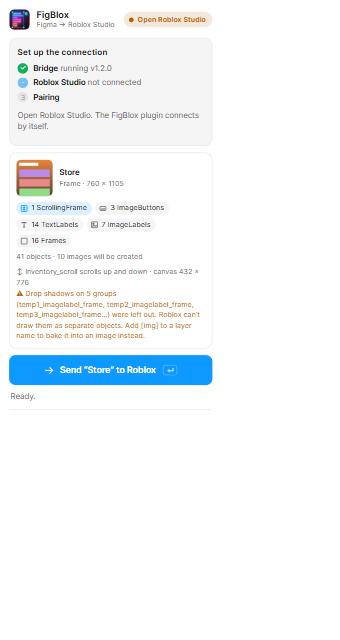
- Figma: a desktop app plugin with a live preview of exactly what a send will create. Frames, auto layout, grids, strokes, gradients, corner radius, live sync while you edit.
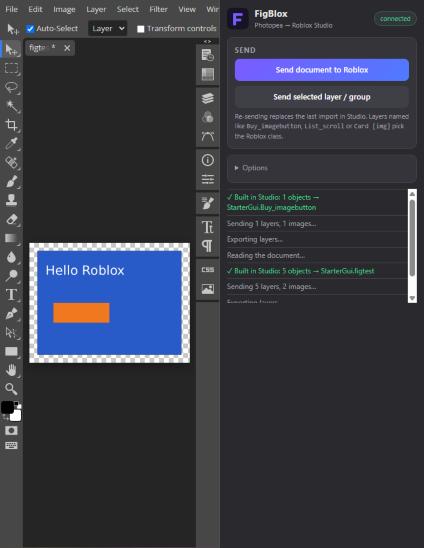
- Photopea: a panel inside Photopea (in Chrome, Edge or Firefox), nothing to install on the Photopea side. Pixel layers, shape layers, smart objects, text layers and groups. Send the whole document or just the selected layer or group.
Set up in about a minute
- Unzip, then double-click install.bat. It installs the Studio plugin, starts a small local helper that starts with Windows, and offers to install Node.js if you don't have it.
- Figma: Plugins, Development, Import plugin from manifest (the path is already on your clipboard). Photopea: Window, Plugins, add figblox-plugin.json.
- Open Roblox Studio, run FigBlox, click Allow once next to the matching code. Done.
Images can be uploaded to Roblox with an Open Cloud API key (best), by Studio itself, or kept as previews. Your key stays on your own computer.
What you get
- The Figma plugin, the Photopea panel, the Studio plugin and the helper program, with the installer and uninstaller
- Full source code (JavaScript and Luau) so you can see what it does and tweak fonts and mappings
- Free updates for every 1.x version
- A license that lets you use FigBlox for any of your own projects, commercial games included. The UI you make with it is yours.
Good to know
- Windows 10 or 11, Roblox Studio, and Figma (desktop app) or Photopea. Node.js 18+ is installed for you if missing.
- Roblox draws scaled text at most 100 px tall, so very large text stops growing on big screens.
- Roblox can't blend layers or draw the shadow of a whole group as one object, so those are baked into an image (and FigBlox tells you when it did).
- Text effects like stroke and shadow can be read from Figma but not from Photopea's scripting; pictures keep their effects either way.
- Safari can't use the Photopea panel because it blocks http://localhost inside https pages.
FAQ
Does my design leave my computer? No. FigBlox runs locally. Images go to Roblox only if you choose Open Cloud or Studio upload, the same way any asset you upload yourself would.
Do I need an API key? No. Without one, Studio uploads the images itself, or you can keep previews while you iterate.
Will it keep working when Figma, Photopea or Roblox update? They change over time. Updates are free for 1.x, and bug reports are welcome.
Is it affiliated with Figma, Photopea or Roblox? No. FigBlox is an independent tool. Figma, Photopea and Roblox are trademarks of their owners.
Support: post in the comments below.
What's new in 1.2
- Photopea support
- Scroll frames are detected automatically
- Text now matches the size you designed (it used to come out small, Press Start 2P about half size)
- New icon and a more helpful note when a list gets baked into an image
Purchase
In order to download this tool you must purchase it at or above the minimum price of $9.99 USD. You will get access to the following files:
Development log
Leave a comment
Log in with itch.io to leave a comment.